Math Moments – Using Vectors in Orienteering

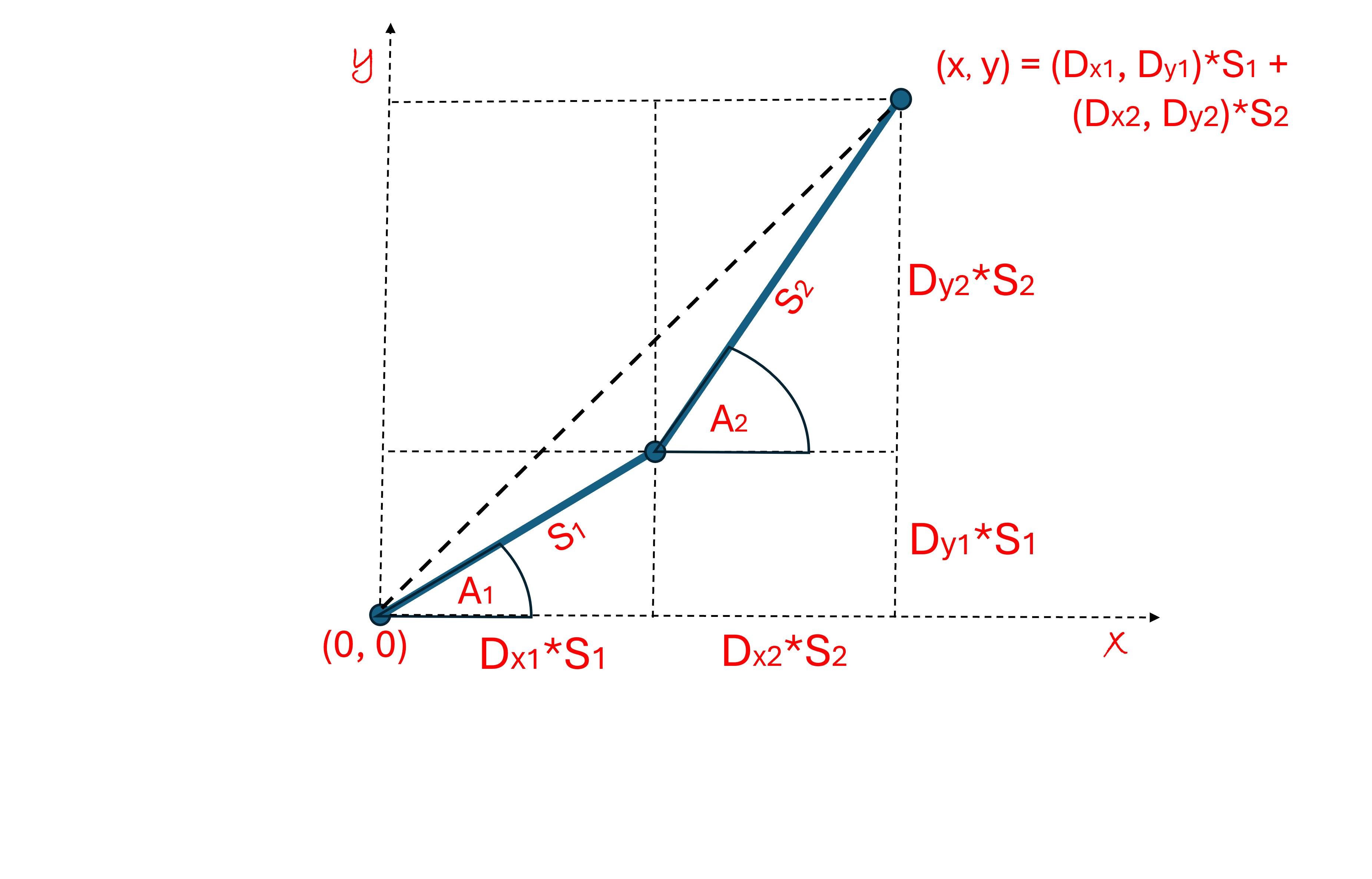
Soldiers and airplanes in unfamiliar places need to find their way around. They can do this with methods similar to what we have already discussed.  They receive instructions to go first in a certain direction (Dx1, Dy1) for a certain distance S1, and then to change course to another direction (Dx2, Dy2) and keep going for a distance S2.  This same pattern can be followed for many different directions and distances. This discipline is called orienteering.  Soldiers are trained to find directions with their compasses and measure distances with the number of steps they take.

With our new vector notation, we can say the same thing in math language:

     (x, y) = (Dx1, Dy1)*S1 + (Dx2, Dy2)*S2

Which says that the point of our destination (x, y) can be found by going in the direction (Dx1, Dy1) for a distance (S1) and then going a direction (Dx2, Dy2) for a distance (S2).  Notice that to find our destination (x, y), we just add these two vectors together.  It is just like piecing together lines to form a path.

Any destination (x, y) is determined by just adding together all the lines (vectors) that form the path in between.  In the example above, there were only 2 directions and distances (lines), but we could keep on going for as many vectors as we want, adding on lines, one line after another until we arrive at our destination.

It is helpful to define yet another notation that is even more compact.

     (x, y) = (Dx1, Dy1)*S1 + (Dx2, Dy2)*S2

   can be written

     (x, y) = [(Dx1, Dy1), (Dx2, Dy2)] . (S1, S2)

The dot “.” between the two vectors is called a “dot product”.  In the case above the dot product means you multiply the first direction vector in the square brackets [1,2] with the first distance in the round brackets (1,2) and do the same with the second direction vector and second distance and then add them both together.

This new notation might seem a bit mysterious at first, but it does make things clearer later on.  The dot product is one of the most fundamental operations of “linear algebra” which is the math that tells you where you end up when adding together a bunch of lines (vectors) to form a path.

We do something similar to write the (x, y) coordinates of a point in our cartesian plane.  Let’s look at the point (3, 4), we can get there by walking along the x-direction 3 units, then turning left 90 degrees and walking in the y-direction 4 units:

    x-direction: (Dx1, Dy1) = (1, 0)
    y-direction: (Dx2, Dy2) = (0, 1)

Then using the “dot product” notation we discussed above:

    (x, y) = [(Dx1, Dy1), (Dx2, Dy2)].(S1, S2)

    (x, y) = [(1, 0), (0, 1)].(3, 4)
               = (1, 0)*3 + (0, 1)*4
               = (3, 0) + (0, 4)
               = (3+0, 0+4)
               = (3, 4)

We find that we end up at the point (3, 4).  This is also one way in the cartesian coordinates that we can define the location of a point.  So, the [(1, 0), (0, 1)] vector when “dotted” with any two distances (Sx, Sy) brings you to the point (x, y) = (Sx, Sy).

     (x, y) = [(1, 0), (0, 1)].(Sx, Sy) = (Sx, Sy)

Do you get the point?  You are starting to see the “language” of the dot product.  In math language a vector of vectors is called a matrix and [(1, 0), (0, 1)] is called the “identity matrix”, because when you dot it with any vector you get back the same vector.

The dot product can be applied to any two vectors of the same size. This concept is used all over the place.  Here is an interesting example, we can use the dot product notation to write down the number 365 (in decimal) starting with the vector (3, 6, 5):

   (3, 6, 5).(100, 10, 1) = 3*100 + 6*10 + 5*1 = 365

This is how we write numbers (in base 10). It is read like this: 3 in the 100’s column, 6 in the 10’s column and 5 in the one’s column, added together, normally written “365”.

We could also use it to find the number of seconds from midnight to 04:35:20am from the vector (4, 35, 20):

   (4, 35, 20).(3600, 60, 1) = 4*3600 + 35*60 + 1*20
                                                  = 16520 sec

There are 3600 seconds in an hour, and 60 seconds in a minute.  I think you got the idea.

Standard

Math Moments – Drawing Lines

If we want to show a computer how to draw lines in a virtual world (using a 2-D cartesian grid), then the best tools are things called parametric equations.  When drawing a line, the 3 parameters we need are:
(1) the starting point: (x0, y0), (2) the direction of the line: Dx, Dy, and (3) the length of the line: S.
The “parametric equations” that draw a line are written like this:

    x = x0 + (Dx * S)
    y = y0 + (Dy * S)

where x and y mark the point where the “pencil” is placed on the grid when drawing the line. Notice how “symmetrical” the equations are. Can you guess what the “z” coordinate would look like for drawing lines in 3-Dimensions?

We will learn how to find the Dx, Dy direction parameters later. Notice that plugging S = 0 in the equations above sets the “pencil” at the starting point (x = x0, y = y0).  When S = 1, the pencil has moved a distance of 1 unit away from the starting point, a distance Dx in the x-direction and a distance Dy in the y-direction. The pencil is now at the point (x = x0 + Dx, y = y0 + Dy), as seen when plugging S = 1 into equations. See the diagram above. Since the “pencil” has moved a total distance of 1 unit in total, we know from the Pythagorean theorem that:

   Dx2 + Dy2 = 12.

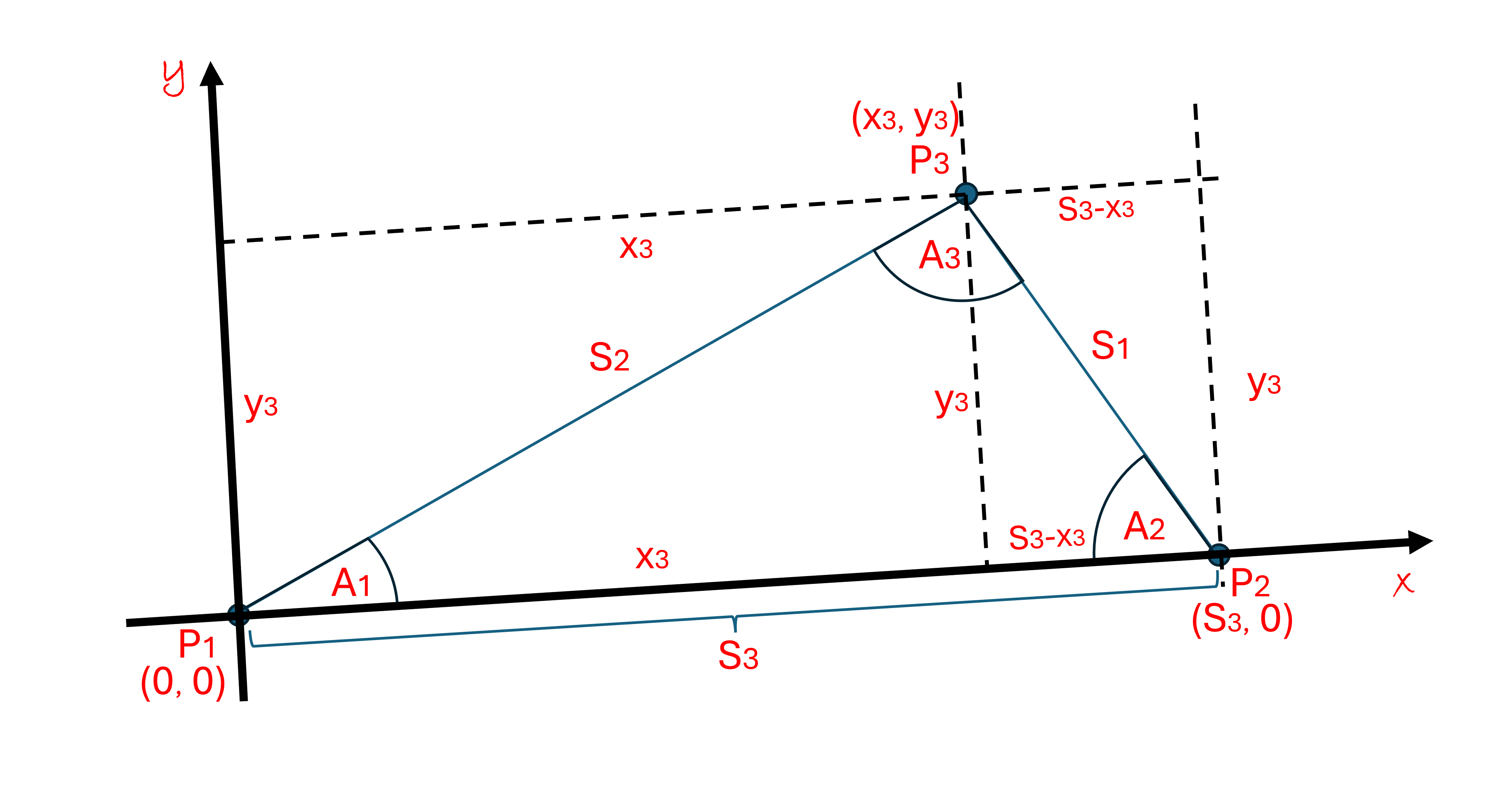
To draw our first line, let us first look at the simplest example: drawing the side S3 of the triangle in the diagram.  Note that we have changed the diagram a bit from previous posts, here we use the symbols x3 and y3 to specify the point P3:(x3, y3) and we now name the symbols x and y to mark the point where the pencil is drawing the line on the grid.

We picked the grid so that the line segment S3 lies along the x-axis. If we start at the point P1:(0, 0), then the starting point parameters are: x0 = 0 and y0 = 0.  This line segment ends at the point P2:(S3, 0), where x = S3, y = 0, and S = S3.  Thus, plugging these values into the parametric equations gives us:

     x = S3 = 0 + (Dx * S3)
     y = 0 = 0 + (Dy * S3)

It is not too hard to see that Dx = 1 and Dy = 0. And so, the complete parametric equations, with these parameters are:

     x = 0 + (1 * S) = S
     y = 0 + (0 * S) = 0

Let’s try this out. Remember, the point (x, y) determines the point where the “pencil” is drawing the pixel on the computer screen. To draw the S3 side you start with S = 0, where the “pencil” is at point P1:(0, 0) and then increase the length of the line, S, by one pixel length, compute x and y and draw in the next pixel at the point (x, y).  You keep on increasing S one pixel length at a time and drawing in pixels until the total length of the complete line segment is S3, when S = S3, you have reached the point P2:(S3, 0) and the S3 line segment is complete.

Note that you could also draw the line by putting your pencil on starting point P2 and drawing in the negative direction until you reach P1.  Since you are drawing in the negative direction, this time the parameter x0 = S3 and Dx = -1. Plugging these into the parametric equation for this line segment:

   x = S3 + (-1 * S) = S3 – S
   y = 0

Try it out.  When S = 0, your pencil is at P2:(S3, 0).  As S increases, the line is growing in the negative direction until S = S3 and then x = S3 – S3 = 0 at P1:(0, 0).  The same line segment has been drawn backwards.

Things get a little more interesting when finding the parameters to draw the side S2.  Let’s start at P1:(0, 0) and draw a line segment S2 to P3:(x3, y3).  As before, at the starting point P1, x0 = 0 and y0 = 0.  Things get just a bit more interesting when trying to find the direction parameters Dx and Dy.  The parametric equations are:

     x = 0 + (Dx * S) = Dx * S
     y = 0 + (Dy * S) = Dy * S

and at the endpoint P3, the parameters are S = S2, x = x3 and y = y3. Plugging them in:

    x = x3 = Dx * S2  and so Dx = x3/S2
    y = y3 = Dy * S2 and…     Dy = y3/S2

Note that: Dx2 + Dy2 = x32/S22 + y32/S22 = (x32 + y32)/ S22 = 1, recall that x32 + y32 = S22 from the Pythagorean Theorem and everything checks out.

Finally, the parametric equations can be written:

     x = (x3/S2) * S
     y = (y3/S2) * S

Now, in the last blogpost, we saw that the definition the Cos(A1) and Sin(A1) were:

Cos(A1) = x3/S2
Sin(A1) = y3/S2

These are exactly what you see in the equations above, Thus, the parametric equations for the line segment S2 are:

       x = Cos(A1) * S
y = Sin(A1) * S

Where S goes from 0 to S2. Quickly, if we want to draw this line in reverse, from P3 to P1, then our starting point is (x3, y3), moving in the negative direction, thus:

      x = x3 – Cos(A1) * S
y = y3 – Sin(A1) * S

Again S goes from 0 to S2.

The equations above will also draw circles.  If you keep the distance (S) constant and vary the angle (A1) from 0 to 360 degrees, the (x, y) “pencil” will sweep out all the points on a circle that are a radius S away from the center (x0, y0).  This is an extra bonus.

For reference, below are the general parametric equations for drawing both lines and circles:

       x = x0 + Cos(A1) * S
       y = y0 + Sin(A1) * S

If you want to draw lines, vary S.  If you want to draw circles, vary the angle A1.

Our last task is finding the parametric equations to draw the last side, S1.  Let’s start at the point P2:(S3, 0) and go to P3:(x3,  y3).  And so, our starting point is x0 = S3 and y0 = 0.  We just need to find the Dx and Dy parameters.  We can find these by looking at the parameters at the ending point, x = x3 and y = y3, and S = S1, thus:

     x3 = S3 + (Dx * S1)   thus   Dx = (x3 – S3)/S1
     y3 = 0 + (Dy * S1)    thus   Dy = y3/S1

If we want to write Dx and Dy in terms of the angle A2, then we need to find expressions for Cos(A2) and Sin(A2). Looking at the diagram, the triangle in the left dashed box has a base of length x3 and the side S2, forming the angle A1.  In the right dashed box, the triangle has the base length S3-x3, with the side S1 that form the angle A2.  The left and right triangles face each other and are joined by the common height length y3.  If we map out the corresponding parts of the left and right triangles:

Left –> Right
    x3 –> (S3-x3)
    y3 –> y3
    A1 –> A2
    S2 –> S1

                                    Thus

Cos(A1) = x3/S2  –> Cos(A2) = (S3 – x3)/S1
Sin(A1) = y3/S2   –>  Sin(A2) = y3/S1

This idea of mapping is very powerful, especially when it is used to change perspectives from one frame of reference to another.  In this case, it gives us the desired expressions that we need to draw the line segment S1 in the perspective of the angle A2. Below are the resulting parametric equations, with Dx and Dy as found a few paragraphs ago:

   Dx = (x3 – S3)/S1 = -(S3 – x3)/S1 = -Cos(A2)
   Dy = y3/S1 = Sin(A2)

Thus

     x = S3 + (-Cos(A2) * S) = S3 – (Cos(A2) * S)
     y = Sin(A2) * S

Check it out!  After a little practice, finding the parametric equations for lines and circles becomes very easy to do, much easier than other methods.

 One huge advantage of using these parametric equations is that the parameter S in these equations is the actual distance of the point (x, y) from the starting point (x0, y0).  At times, this is convenient when measuring the distance between points along a given angle.  Some examples of this will be given in later posts.  It makes geometry problems so much easier.

Standard